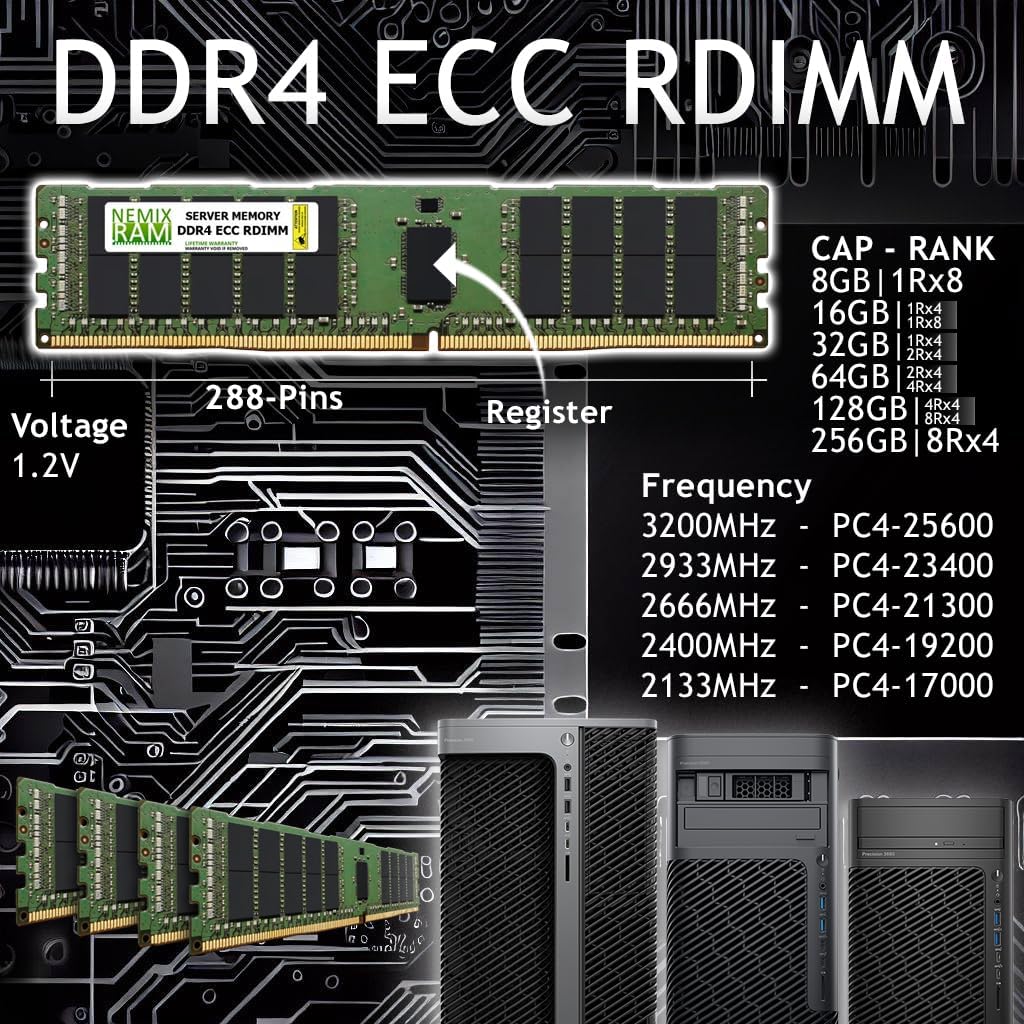
Imagine your RAM as a very fast messenger passing notes between your CPU and your software. Now imagine that occasionally — rarely, but real — one of those notes gets a single character scrambled in transit. On a gaming PC, that might mean a brief stutter or a crash that you reboot out of in thirty seconds. On a workstation mid-way through a six-hour Houdini simulation or a 2,000-part SolidWorks assembly, it can mean corrupted output files, a mysteriously wrong render, or a full pipeline stall. ECC RAM — Error-Correcting Code memory — is the type of workstation memory that detects and silently fixes those single-bit scrambles on the fly, before they propagate into your work. This guide explains what ECC actually does, when it matters (and when it genuinely doesn’t), and how to match the right memory specification to the workstation tier you’re buying or spec’ing today.
| EDITOR'S PICK[Samsung 64GB DDR5 4800MHz PC5-3…](https://www.amazon.com/dp/B0CFG7THWM?tag=greenflower20-20) | Mid-tier[NEMIX RAM 128GB (4X32GB) DDR4 3…](https://www.amazon.com/dp/B0CB6WNY2X?tag=greenflower20-20) | Budget pick[A-Tech 64GB Kit (2x32GB) DDR4 2…](https://www.amazon.com/dp/B0BPN48JTW?tag=greenflower20-20) | |
|---|---|---|---|
| Capacity | 64GB | 128GB (4x32GB) | 64GB (2x32GB) |
| Speed | 4800MHz | 3200MHz | 2666MHz |
| DDR Generation | DDR5 | DDR4 | DDR4 |
| Voltage | 1.1V | 1.2V | 1.2V |
| Price | $1,889.99 | $1,505.49 | $291.87 |
| See on Amazon → | See on Amazon → | See on Amazon → |
What ECC Actually Does — and What It Doesn’t
ECC is not magic, and it’s worth being precise about what the “error correction” label covers.
Standard consumer RAM — DDR5 or DDR4 — stores data in binary bits. The physics of semiconductor memory means that high-energy particles (cosmic rays, alpha radiation from chip packaging) can occasionally flip a stored bit from 0 to 1 or vice versa. These are called single-event upsets or soft errors. They’re probabilistic, not catastrophic, but the probability isn’t zero. Per published research aggregated by Puget Systems in their overview of ECC memory for professional workstations, a typical DRAM module experiences a soft error roughly once every few thousand hours of operation — a rate that sounds small until you’re running 128 GB across dual sockets in a render farm that never powers down.
ECC RAM adds extra bits to each memory word — typically one byte of additional storage per eight bytes of user data — and uses a Hamming code to detect and correct any single-bit error in real time. It can also detect (but not auto-correct) double-bit errors, flagging them to the OS so the system can halt gracefully rather than silently proceeding with corrupted data. The correction happens at the memory controller level, in nanoseconds, with no software overhead visible to your application.
What ECC does not do:
- It doesn’t protect against multi-bit errors (those require more expensive CHIPKILL or advanced ECC schemes used in server-grade platforms).
- It doesn’t compensate for poor memory channel configuration, XMP overclocks, or a BIOS that has DRAM training instability.
- It doesn’t replace the value of validated, ISV-certified memory on platforms like Xeon W or Threadripper Pro, where the workstation OEM (Dell, HP, Lenovo) has run compatibility testing the memory manufacturer alone cannot perform.
Tom’s Hardware’s explainer on ECC vs. non-ECC RAM makes a useful analogy: ECC is a seatbelt, not a crumple zone. It’s designed for the ordinary risk that’s always present, not for catastrophic failure modes. Keep that scope in mind when evaluating whether ECC justifies its cost premium for your specific workflow.
The Workstation Platform Question: Not Every CPU Supports ECC
This is the practical decision gate most buyers hit first, and it’s where a lot of mid-range buying mistakes happen.
Consumer platforms (Core Ultra 200, Ryzen 9000 series): AMD’s mainstream Ryzen desktop processors technically support ECC at the silicon level — this has been documented in multiple AnandTech workstation platform analyses — but motherboard support is inconsistent, error logging is rarely exposed to the OS, and no major workstation OEM ships a validated, ISV-certified ECC configuration on these platforms. You can often run ECC DIMMs in a Ryzen system; you may not actually get correction events logged or acted on. For solo freelancers doing motion graphics in Adobe After Effects, this is probably acceptable. For anything involving long-running simulations or financial CAD output, it’s not.
Intel Xeon W (W-2400, W-3400) and AMD Threadripper Pro (7000WX series): These are the workstation-native platforms — the ones inside a Dell Precision 7960, HP Z8 Fury G5, or Puget Systems Genesis. Both fully support Registered ECC (RDIMM) or Load-Reduced ECC (LRDIMM) memory with proper OS-level error logging via MCELOG or Windows WHEA. Both platforms require a server/workstation chipset (Intel W790, AMD WRX90) to expose these features correctly. Ars Technica’s coverage of ECC in professional computing notes that the distinction between “ECC supported at the CPU” and “ECC validated at the platform level” is precisely where consumer-grade motherboards fall short, even when they technically pass memory.
Apple Silicon (M3 Ultra, M4 Max/Ultra): Apple’s unified memory architecture uses on-die ECC implemented at the memory package level. Apple doesn’t publish the specific implementation details publicly, but their platform is a closed, validated stack where ECC behavior is consistent and hardware-verified. For VFX and motion design workloads on the Mac Studio or Mac Pro, this is a real and functional form of ECC protection, even though you can’t configure or upgrade the memory yourself.
By the Numbers
| Platform | ECC Type | OS Error Logging | Upgradeable |
|---|---|---|---|
| Intel Xeon W-3400 | RDIMM / LRDIMM | Yes (WHEA, MCELOG) | Yes |
| AMD Threadripper Pro 7000WX | RDIMM / LRDIMM | Yes (WHEA) | Yes |
| AMD Ryzen 9000 (consumer) | Unbuffered ECC (limited) | Inconsistent | Yes |
| Apple M4 Ultra | On-die ECC | No user access | No |
| Intel Core Ultra 200 (consumer) | None | No | Yes |
Speed vs. Reliability: The Trade-off That’s Less of a Trade-off Than It Looks
The common objection to ECC in creative professional conversations is performance: “ECC is slower.” This was meaningfully true in the DDR3 era and is less true today, but it’s not zero.
Per published spec comparisons from Puget Systems’ workstation memory benchmarking documentation, the latency overhead of ECC on modern Xeon W and Threadripper Pro platforms typically amounts to a 1–3% reduction in memory bandwidth versus non-ECC at equivalent clock speeds. In real-world VFX and CAD benchmarks — Cinebench, SPECworkstation, Chaos V-Ray, or Houdini pyro simulations — that difference is statistically present but almost never perceptible in your actual timeline. The scenarios where raw memory bandwidth is a meaningful bottleneck (in-memory video decompression at 8K RED or ARRI RAW, for instance) are the same scenarios where you’d be running 256 GB or more of memory anyway, at which point the absolute bandwidth figures on Xeon W or Threadripper Pro platforms dwarf what any consumer DDR5 configuration can deliver.
The speed-vs-reliability framing also misses the actual cost of a single corrupted render or a simulation that produces a wrong answer you don’t catch until client review. Puget Systems’ published guidance on workstation memory for professional users makes this point directly: for a workstation that’s billing at $150–$400/hour of rendered compute time, a single corrupted overnight render job costs more than the price differential between ECC and non-ECC memory — often by a factor of 10 or more.
When ECC Matters Most — and Honest Caveats for When It Doesn’t
High-stakes scenarios where ECC earns its cost
- Long unattended render jobs (overnight V-Ray, Arnold, or Redshift renders with complex light path expressions): the longer the job, the more accumulated soft-error exposure.
- FEA and CFD simulation (Ansys, Nastran, OpenFOAM): numerical simulations can amplify a single-bit error into a structurally meaningless — or dangerously wrong — result.
- Multi-seat render farms and render nodes: the aggregate soft-error rate across 16 nodes running 24/7 is non-trivial. VFX pipeline supervisors sourcing BOXX APEXX or Puget Genesis render nodes should treat ECC as non-negotiable.
- Broadcast mastering and archival encoding: a corrupted frame in a mezzanine encode isn’t always visible in QC and can propagate into distribution masters.
Cases where non-ECC is a defensible choice
- $800–$1,500 entry-level workstations (Dell Precision 3680 with Core Ultra CPU, Lenovo ThinkStation P3 in base config): these systems ship on consumer/near-consumer platforms that don’t fully validate ECC anyway. Spend the budget on a faster GPU or more total RAM rather than chasing theoretical ECC support that isn’t fully implemented.
- Interactive design and motion graphics work where the worst case for a soft error is a crash, not corrupted persistent output: After Effects, Premiere, and DaVinci Resolve Fusion are session-based enough that a forced restart costs minutes, not hours.
- Mac Studio / Mac Pro (for those working in that ecosystem): on-die ECC is already present and handled for you — this isn’t a decision you need to make.
Practical Buying Guidance: Matching ECC Spec to Workstation Tier
Entry tier ($800–$2,500): If you’re on a Core Ultra or mainstream Ryzen platform, focus on total capacity and speed — 64 GB DDR5-5600 will serve you better than a smaller kit of marginal ECC DIMMs in an unvalidated configuration. The platform isn’t the right host for ECC anyway.
Mid-tier ($3,500–$8,000): If you’re stepping into a Xeon W-2400 or Threadripper Pro 7000WX system — a Dell Precision 5860, HP Z4 G5, or Lenovo ThinkStation PX — spec Registered ECC DIMMs from the OEM’s validated HCL (Hardware Compatibility List). Kingston, Micron, and Samsung all manufacture RDIMM stock that the major workstation OEMs certify. Don’t buy non-certified DIMMs just to save $40 per module; the ISV driver certification that makes Autodesk Maya or Siemens NX supported on that system depends on the platform running as tested.
Premium and specialty tier ($10,000+): At this level — HP Z8 Fury G5, Puget Systems Genesis, BOXX APEXX S3, and similar — ECC RDIMM or LRDIMM is standard and non-negotiable. The meaningful configuration decisions shift to: registered vs. load-reduced (LRDIMM makes more sense above 512 GB total capacity, where its buffering overhead is justified by the capacity scaling), memory channel population (fill all channels before adding capacity per channel for maximum bandwidth), and whether your pipeline warrants the added cost of Micron or Samsung “Pro” binned DIMMs with published error-rate guarantees. Puget Systems publishes their validated memory configurations for each platform they ship — referencing that documentation before placing a custom order is time well spent.
The Decision Rule
If you’re on a Xeon W or Threadripper Pro platform and your work involves jobs longer than two hours, output that feeds a client master, or a pipeline where a wrong result is harder to detect than a crash — spec ECC, buy from the platform HCL, and don’t trade it away for a clock-speed bump that won’t move your real-world benchmark by more than 2%. The reliability argument is not hypothetical; it’s documented in aggregate soft-error rate data and in the consistent guidance from Puget Systems, Ars Technica, and AnandTech across nearly a decade of professional workstation analysis.
If you’re on an entry-level consumer platform and the platform doesn’t validate ECC properly — don’t spend money on the illusion of ECC. Invest in capacity, invest in the GPU, and revisit the memory platform question when you’re ready to move up the stack. The protection only works when the entire platform — CPU, chipset, motherboard, BIOS, and OS error logging — is built to support it.
ECC isn’t glamorous marketing. It’s the part of your workstation that quietly protects work you can’t afford to redo.